ServiceTitan vs Jobber vs Housecall Pro: Which Fits a Small Contractor?
ServiceTitan vs Jobber vs Housecall Pro for small contractors: who should pick which, listed pricing as of Nov 10, 2026, and a revenue-based way to choose.
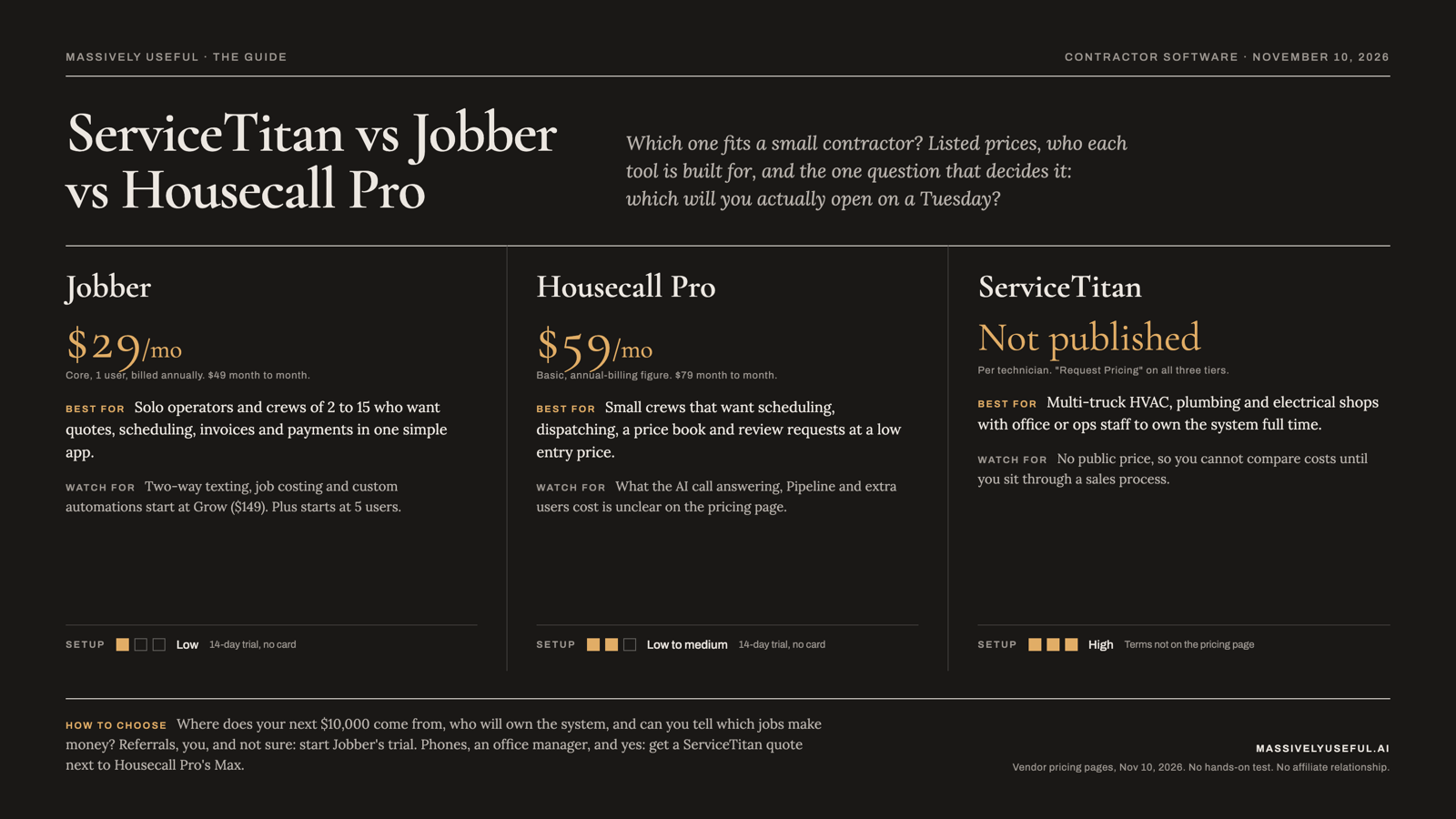
The short verdict: If you run one to roughly ten people and want something you can start using this week, pick Jobber (simplest, cheapest at the low end) or Housecall Pro (more dispatch and price book tools in the lower tiers). If you run a multi-truck HVAC, plumbing or electrical shop with someone who can own the system full time, ServiceTitan is the one to get a quote on, because it is built for that scale and it does not publish a price.
Who this is for
Owner-operators and small crews in home services (HVAC, plumbing, electrical, landscaping, remodeling, roofing) with roughly 1 to 15 people on the payroll, who are deciding on their first or next job management system.
A scene from the landscaper's week
A landscaper I talk to, who works residential jobs around DC, has told me his biggest problem is finding a consistent source of new leads. He is also trying to market the business and run the business at the same time, and on any given morning the crew wins. Software shopping has the same trap: the tool that dazzles in a demo often asks the most of an owner who is already out of hours. So this comparison leans on one question: which tool will you actually open on a Tuesday?
A note on what I can and cannot tell you. Massively Useful has not run a hands-on, side-by-side test of these three products, and I am not going to pretend otherwise. Everything about features and pricing below comes from each vendor's own public pages, read on the date above. Where I am offering a judgment, I say so.
The comparison table
Pricing is as listed on each vendor's pricing page on November 10, 2026, in US dollars, before sales tax. Prices change often, so confirm before you buy.
| Tool | Best for | Pricing (as of Nov 10, 2026) | Setup effort | Biggest weakness |
|---|---|---|---|---|
| Jobber | Solo operators and crews of 2 to 15 who want quotes, scheduling, invoices and payments in one simple app | Core (1 user) $29/mo billed annually; Connect from $99; Grow from $149; Plus from $399 (5 users). Month-to-month costs more (Core $49). Extra users $29/mo each. | Low (my judgment). 14-day trial, no credit card. | Some of the features owners ask about (two-way texting, job costing, custom automations) start at the Grow tier, and Plus starts at 5 users. |
| Housecall Pro | Small crews that want scheduling, dispatching, a price book and review requests at a low entry price | Basic $59/mo, Essentials $149/mo, Max $299/mo, shown as annual-billing prices (my reading of the page; see note). | Low to medium (my judgment). 14-day trial, no credit card. | Per-plan details around the AI call answering, Pipeline and extra-user pricing are unclear on the page. |
| ServiceTitan | Multi-truck HVAC, plumbing, electrical and similar shops with ops or office staff | Not published. Per-technician pricing, "Request Pricing" on every tier (Starter, Essentials, The Works). | High (my judgment). Contract and onboarding terms are not on the pricing page. | No public price, so you cannot compare costs until you sit through a sales process. |
Note on Housecall Pro: the page lists $59, $149 and $299 under an "annually billed" label, with higher monthly-billing prices ($79, $189, $329) and several promotional discounts. The labeling is not fully explicit, so I read it that way and recommend confirming on the live page.
Each tool, briefly
Jobber
Best for: A solo operator or small crew whose real problem is going from "I do it all on paper and text messages" to "quotes, schedule, invoices and payments live in one place." The entry plan is $29 a month for one user when billed annually, which is the lowest price in this comparison.
Skip if: You need heavy dispatch for a larger fleet, or you want a tool that is part of a bigger enterprise setup. Also skip the lowest tier if you want automated follow-ups, since Jobber's page puts automated quote and invoice follow-ups starting in the Connect plan, and two-way texting and job costing in Grow.
What the public page shows: Four plans (Core, Connect, Grow, Plus), seat-based pricing, a 14-day trial with full access to Grow, and add-ons that include an AI Receptionist at $29 a month, Pipeline at $49 and a Marketing Suite at $99. The Plus plan also lists an AI receptionist and Pipeline in its feature bullets, and the page does not make clear whether they are included or extra on Plus, so ask. The page says annual prepayment is non-refundable.
What Danny's team actually saw: No first-hand testing of Jobber to report. Public information only.
Housecall Pro
Best for: A small crew that wants scheduling and dispatching, a price book, estimates, invoices, review management and job costing, starting at $59 a month on the entry plan, with a 14-day trial.
Skip if: You want a clear, published answer on what the AI call answering costs. The page says "AI team members" are part of every plan, and separately links a CSR AI product and a call answering product with no price or plan stated.
What the public page shows: Basic, Essentials and Max. Basic includes 1 user, Essentials 5 and Max 8 (additional Max users are $35 a month). QuickBooks Online sync, employee phone GPS tracking and checklist automations appear at Essentials, and the sales proposal tool, recurring service plans, route optimization, open API access and a dedicated onboarding specialist appear at Max. The page says there are no long-term contracts. Card processing is listed from 2.59%.
What Danny's team actually saw: No first-hand testing of Housecall Pro to report. Public information only.
ServiceTitan
Best for: A larger residential or commercial trades company, for example a multi-truck HVAC, plumbing or electrical business, that has someone who will own the system and wants dispatching, call booking, a price book, memberships, payroll and advanced reporting in one platform. The site also markets to enterprise and private-equity-backed groups.
Skip if: You want to know the cost before you talk to a salesperson. ServiceTitan's pricing page shows three tiers (Starter, Essentials, The Works), no dollar amounts, and a "Request Pricing" button on each. It describes pricing as per technician. The page does not state contract length or setup fees, and I did not find third-party numbers I would trust enough to print.
What the public page shows: Dispatching, scheduling, call booking, invoicing and a price book on every tier. Mobile estimates, payroll management, advanced reporting, commission tracking and customizable memberships appear across the tiers (the page's formatting made it hard to tell exactly which tier gets which, so confirm in a demo).
What Danny's team actually saw: No first-hand testing of ServiceTitan to report.
How to choose: three revenue questions
Skip the feature checklist. Ask these instead.
1. Where does your next $10,000 of revenue come from? If it comes from referrals and repeat work, as it does for my neighbor, who has been remodeling houses around DC for years and works mainly off referrals, you mostly need clean quotes, fast follow-up and a place to remember past customers. Jobber or Housecall Pro covers that. If it comes from a phone that rings all day and a crew of dispatchers, the call booking and dispatch depth of ServiceTitan starts to earn its keep.
2. Who will own the system? The most expensive software is the one that nobody maintains. If the answer is "me, on Sunday nights," pick the tool with the shortest setup. If the answer is "an office manager who does this full time," the heavier platform becomes realistic.
3. Can you tell which jobs make money? With JJB Home Improvements, a client, the situation we ran into is that it would take them a long time to answer which jobs actually make money, mostly because overhead is hard to pin down and subcontractor costs and margins are hard to track on subbed-out jobs. Job costing shows up in Housecall Pro's Basic plan and Jobber's Grow plan, and ServiceTitan lists advanced reporting. A tool only helps here if you enter your real costs. Whichever you choose, ask in the demo to see one finished job with its real margin.
If you answered "referrals, me, and I don't know," start with Jobber's trial. If you answered "phones, an office manager, and yes, but slowly," get a ServiceTitan quote and compare it to Housecall Pro's Max.
Disclosure
Massively Useful is a consultancy that builds customer-management and data systems for home service businesses, so we are not a neutral party when a contractor asks whether they need software at all. We have no reseller, referral, affiliate or partner relationship with ServiceTitan, Jobber or Housecall Pro, and we are not paid for mentioning them.
Frequently asked questions
Is ServiceTitan too big for a small contractor? It depends on your size and who runs it. The company markets to commercial and residential trades of all kinds, including enterprise groups, and its pricing page says per-technician pricing fits "any size," but it publishes no prices. Ask for the total first-year cost in writing, including onboarding.
Which has the lowest listed price? Jobber's Core plan, at $29 a month for one user billed annually, is the lowest listed price here. Housecall Pro's Basic is $59 a month on its annual-billing figure. ServiceTitan does not list one.
Do any of them answer calls with AI? Jobber lists an AI Receptionist as a $29 a month add-on (and also in its Plus plan bullets). Housecall Pro mentions AI team members in every plan and has separate call answering and CSR AI products with no price on the pricing page. Test any of them with your own after-hours calls before relying on them.
How hard is it to switch later? I could not verify a clean answer for any of the three. Before signing, ask for a trial export of your customers, jobs and price book, and ask whether the one-year or annual terms lock you in.
Not sure which one fits?
Massively Useful offers a Revenue Audit that looks at where your leads and jobs actually go before you pick a tool. Book one at massivelyuseful.ai.
Sources (all read November 10, 2026): Jobber pricing; Housecall Pro pricing; ServiceTitan pricing and ServiceTitan homepage.